
7 Games for Teaching Children Programming
Author: Rocket Tech School
Publication date: 08.04.2026 | Review date: 16.04.2026
Parents increasingly wonder which programming game is best to start with so that a child can calmly take the first steps into the world of code. Textbooks and long lectures quickly become tiring, while the game format is more familiar: there are levels, clear goals, and visible results after each step. In this version, programming for children is perceived as an interesting activity rather than just another school subject. By completing tasks in a game, the child gradually masters logic and algorithms, practices finding solutions, and becomes less afraid of mistakes.
Game platforms help connect programming with what children already like: cartoons, construction sets, and adventures in virtual worlds. This makes learning more visual and motivates them to return to the lessons. In this article, we will examine how programming games are useful for a child, how to choose the appropriate level, and which seven projects can be considered as a starting point.
Game platforms help connect programming with what children already like: cartoons, construction sets, and adventures in virtual worlds. This makes learning more visual and motivates them to return to the lessons. In this article, we will examine how programming games are useful for a child, how to choose the appropriate level, and which seven projects can be considered as a starting point.
Table of Content
1. Why games help in learning programming
2. How to choose a game for teaching children programming
3. 7 games and platforms worth trying
3.1 Scratch: visual stories and cartoons
3.2 Minecraft Education and code-based mods
3.3 Roblox Studio and scripts in Lua
3.4 Code.org: short tasks and bright characters
3.5 Lightbot and logic puzzles
3.6 Tynker and thematic quests
3.7 Robots and kits with visual code
4. How to integrate games into systematic learning
2. How to choose a game for teaching children programming
3. 7 games and platforms worth trying
3.1 Scratch: visual stories and cartoons
3.2 Minecraft Education and code-based mods
3.3 Roblox Studio and scripts in Lua
3.4 Code.org: short tasks and bright characters
3.5 Lightbot and logic puzzles
3.6 Tynker and thematic quests
3.7 Robots and kits with visual code
4. How to integrate games into systematic learning
Why Games Help in Learning Programming
When it comes to studying, many children immediately lose motivation. The game format changes the mood: instead of a dry assignment, the child receives a clear goal — build a robot, complete a maze, launch a rocket. Behind each successful step there is a small fragment of code, and gradually the child becomes accustomed to the logic of commands.
Modern games for learning programming are designed to provide immediate feedback. If the blocks are arranged incorrectly, the character will not reach the finish line, and if everything is correct, the level is completed. For one child, this is a way to feel confident; for another, it is an opportunity to calmly analyze mistakes without fear of getting a bad grade.
Game environments often offer ready-made scenarios for teaching children programming, and parents can see which topics have already been covered. This is more convenient than trying to manually create a learning plan and select tasks from different websites and applications.
Modern games for learning programming are designed to provide immediate feedback. If the blocks are arranged incorrectly, the character will not reach the finish line, and if everything is correct, the level is completed. For one child, this is a way to feel confident; for another, it is an opportunity to calmly analyze mistakes without fear of getting a bad grade.
Game environments often offer ready-made scenarios for teaching children programming, and parents can see which topics have already been covered. This is more convenient than trying to manually create a learning plan and select tasks from different websites and applications.
How to Choose a Game for Teaching Children Programming
Before moving on to specific projects, it is important to understand what to look for when choosing. The main criteria are the child’s age, interests, and level of independence. For primary school students, simple visual environments are suitable, where commands are represented as blocks and the result is visible immediately. Teenagers are more interested in more serious programming games connected with real languages and the creation of their own projects.
Pay attention to how new commands are explained in the chosen game: are there hints, examples, and the ability to return and review a level. It is important that learning progresses gradually and does not overload children with theory. It is good when the platform has different modes: free building, story-based tasks, and ready-made lesson programs.
It is also worth considering how much time children are comfortable spending at the computer. Even the most useful programming game should not completely replace rest, walks, and regular hobbies.
Pay attention to how new commands are explained in the chosen game: are there hints, examples, and the ability to return and review a level. It is important that learning progresses gradually and does not overload children with theory. It is good when the platform has different modes: free building, story-based tasks, and ready-made lesson programs.
It is also worth considering how much time children are comfortable spending at the computer. Even the most useful programming game should not completely replace rest, walks, and regular hobbies.
7 Games and Platforms Worth Trying
Below are seven examples of games for learning programming that can be considered as a starting point. They differ in style, level of difficulty, and types of tasks.
1. Scratch: Visual Stories and Cartoons
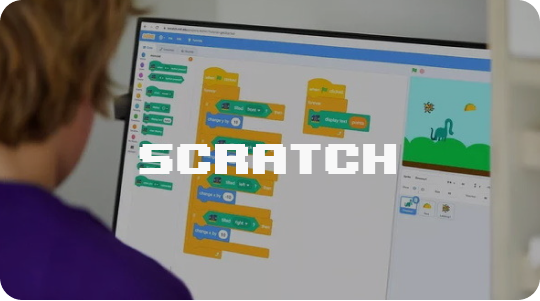
Scratch remains a classic programming game for children: the child drags command blocks, connects them, and controls characters on the stage. Instead of complex syntax, there are clear constructions such as “if,” “repeat,” and “go to coordinates.” In this way, one child creates an interactive postcard, another makes a short cartoon, and a third builds a simple racing game.
The platform is suitable for primary school students and helps them smoothly transition from ordinary games to their first projects. Here it is easy to see how the character’s behavior changes after editing the code, and this motivates the child to experiment.
Website https://scratch.mit.edu/
The platform is suitable for primary school students and helps them smoothly transition from ordinary games to their first projects. Here it is easy to see how the character’s behavior changes after editing the code, and this motivates the child to experiment.
Website https://scratch.mit.edu/
2. Minecraft Education and Code-Based Mods
Versions of Minecraft with programming elements make it possible to combine the beloved block world and programming for children. In special modes, the child uses commands to control an agent: building bridges, digging tunnels, growing plants. Tasks can be made more complex: from simple chains of actions to mini-projects on automation.
This programming game is good because it relies on a familiar environment. It is easier for a child to understand why loops and conditions are needed when they help organize the world in which they already spend time.
Website https://education.minecraft.net
This programming game is good because it relies on a familiar environment. It is easier for a child to understand why loops and conditions are needed when they help organize the world in which they already spend time.
Website https://education.minecraft.net
3. Roblox Studio and Scripts in Lua
Roblox Studio is a world-building tool where each level is the result of a script. Based on this environment, programming games are created with gradual learning of the Lua language. First, the child modifies ready-made templates, then adds their own objects and events.
This platform is suitable for older children who are ready to read text code and slightly understand settings. At the same time, the child gains real experience in creating a game for other people: it is necessary to design levels, rules, and user-friendly controls.
Website https://www.roblox.com/create
This platform is suitable for older children who are ready to read text code and slightly understand settings. At the same time, the child gains real experience in creating a game for other people: it is necessary to design levels, rules, and user-friendly controls.
Website https://www.roblox.com/create
4. Code.org: Short Tasks and Bright Characters
The Code.org website offers many short tasks where programming games for children are built around familiar cartoon and movie characters. The child assembles algorithms from blocks, helps heroes complete levels, and gradually moves on to more complex topics.
The advantage of the platform is that the tasks are divided into small steps, and parents can easily track the child’s progress. The levels are suitable for different ages, so it is possible to choose a course for both a primary school student and a teenager.
Website https://code.org
The advantage of the platform is that the tasks are divided into small steps, and parents can easily track the child’s progress. The levels are suitable for different ages, so it is possible to choose a course for both a primary school student and a teenager.
Website https://code.org
5. Lightbot and Logic Puzzles
Lightbot allows the child to control a small robot that moves across cells and turns on lights. To complete a level, it is necessary to create a sequence of commands and then optimize it using loops and procedures. In programming games for children, the child directly controls an astronaut-robot, and logic helps to complete the tasks.
Such puzzles are appealing to children who enjoy problem-solving and are comfortable with repeated attempts. Lightbot can be considered as mental training before more serious courses.
Website https://lightbot.com
Such puzzles are appealing to children who enjoy problem-solving and are comfortable with repeated attempts. Lightbot can be considered as mental training before more serious courses.
Website https://lightbot.com
6. Tynker and Thematic Quests
The Tynker platform combines story-based quests and block-based programming tasks. There are missions about space, adventures, and animals — the child completes tasks while learning the basics of code. Later, it is possible to transition to real programming languages without changing the familiar interface.
This format helps maintain attention when it is difficult for a child to sit for a long time on abstract tasks. The story and bright design make the process feel like progressing through levels rather than attending a regular lesson.
Website https://www.tynker.com
This format helps maintain attention when it is difficult for a child to sit for a long time on abstract tasks. The story and bright design make the process feel like progressing through levels rather than attending a regular lesson.
Website https://www.tynker.com
7. Robots and Kits with Visual Code
Kits with programmable robots combine construction and programming. The child assembles a model, connects it to an application, and controls its movement through command blocks. This creates a clear connection between the program on the screen and the actions of the toy on the table.
This format is especially useful for children who like to work with their hands and are interested in technology. In some robot programs, it is later possible to switch to text-based programming without changing the basic logic.
This format is especially useful for children who like to work with their hands and are interested in technology. In some robot programs, it is later possible to switch to text-based programming without changing the basic logic.
How to Integrate Games into Systematic Learning
It is important to remember that even the best programming game does not replace a well-designed course. The game format is well suited for starting and maintaining interest, but in order for knowledge to be consolidated, regular repetition and gradual increase in task difficulty are necessary. Ready-made programming games that are included in curricula or offered as part of courses help here.
Parents should agree in advance with the child on how much time they are ready to dedicate to lessons and allocate quiet hours without rush. Adult support is important: you can simply ask what new things the child has learned, which level was challenging, and what they especially liked.
If you want it to be easier for your child to move forward, it is worth looking not only at individual games, but also at what steps follow after them: transitioning to projects, participating in mini-hackathons, and getting acquainted with different languages. In courses at RTS School, game-based tasks are used in programs for Scratch, Minecraft Education, Roblox Studio, and other directions. They gradually transform programming for children from an entertainment format into a conscious skill. Later, this skill can be developed in different courses and in serious educational programs for school students.
Parents should agree in advance with the child on how much time they are ready to dedicate to lessons and allocate quiet hours without rush. Adult support is important: you can simply ask what new things the child has learned, which level was challenging, and what they especially liked.
If you want it to be easier for your child to move forward, it is worth looking not only at individual games, but also at what steps follow after them: transitioning to projects, participating in mini-hackathons, and getting acquainted with different languages. In courses at RTS School, game-based tasks are used in programs for Scratch, Minecraft Education, Roblox Studio, and other directions. They gradually transform programming for children from an entertainment format into a conscious skill. Later, this skill can be developed in different courses and in serious educational programs for school students.
What else is useful to read:
Programming, game development, digital creativity, and AI — choose an IT track that fits your child's age and interests!
6 courses to choose from: from animation to neural networks





Другие курсы


Rocket Tech School LLC (USA)
Rocket Tech School LLP (UK)
IE Ivan Pavliulin
2026
Rocket Tech School LLP (UK)
IE Ivan Pavliulin
2026